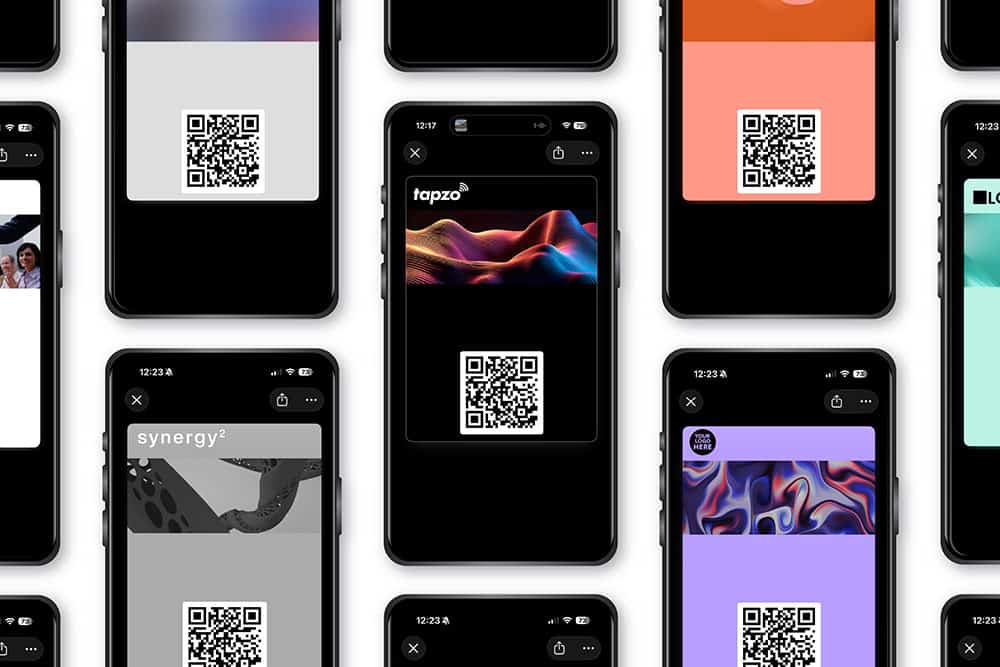
Apple / Google Wallet Business Cards

With Tapzo, you can save a shareable Wallet card directly to Apple Wallet or Google Wallet, making it quick and easy to share your digital business card from your phone.

Your Apple Wallet or Google Wallet card is not the digital business card itself. It is a simple sharing tool that contains a QR code linked to your Tapzo digital business card profile.

Simply open your Wallet card and let someone scan your QR code. Your Tapzo digital business card profile then opens on their phone, where they can view your details, save you to their contacts, visit your links, and even send their details back to you.

Your digital business card, always ready to share from your phone’s Wallet.

What is an Apple Wallet or Google Wallet card?

An Apple Wallet or Google Wallet card is a digital pass saved to your phone’s Wallet app. With Tapzo, this Wallet card contains a QR code linked to your digital business card profile.

The Wallet card itself is not your digital business card.

It is one of the easiest ways to access and share it.

Your digital business card is the live online profile people see after scanning your Wallet QR code.

That profile can include your contact details, company information, links, social profiles, booking links, files, videos, lead capture, and more.

Think of your Wallet card as the shortcut and your Tapzo profile as the actual digital business card.

The person receiving your card does not need an app. They simply scan your QR code and open your Tapzo profile in their browser. See video of this in action.

When you want to share your details:

Open Apple Wallet or Google Wallet.
Select your Tapzo Wallet card.
Let the other person scan the QR code.
Your digital business card profile opens on their phone.

They can save your contact, visit your links, or send their details back to you.

Why use a Wallet card to share your digital business card?

A Wallet card gives you one of the easiest ways to share your digital business card.

Your phone is usually already in your hand, pocket, or bag. By saving your Tapzo Wallet card to Apple Wallet or Google Wallet, you can access your digital business card quickly whenever you meet someone.

Always ready to share

Your Wallet card is saved in your phone’s Wallet, ready whenever you need to share your digital business card. 

No physical card needed

You do not need to carry anything extra with you.

Your Wallet card gives you a simple QR code that opens your Tapzo digital business card profile.

Easy for people to save your details

No manual data entry like paper business cards, with Tapzo your digital business card opens on their phone so they can save your details in one tap directly to their contacts.

Can you create your own Apple Wallet and Google Wallet card design?

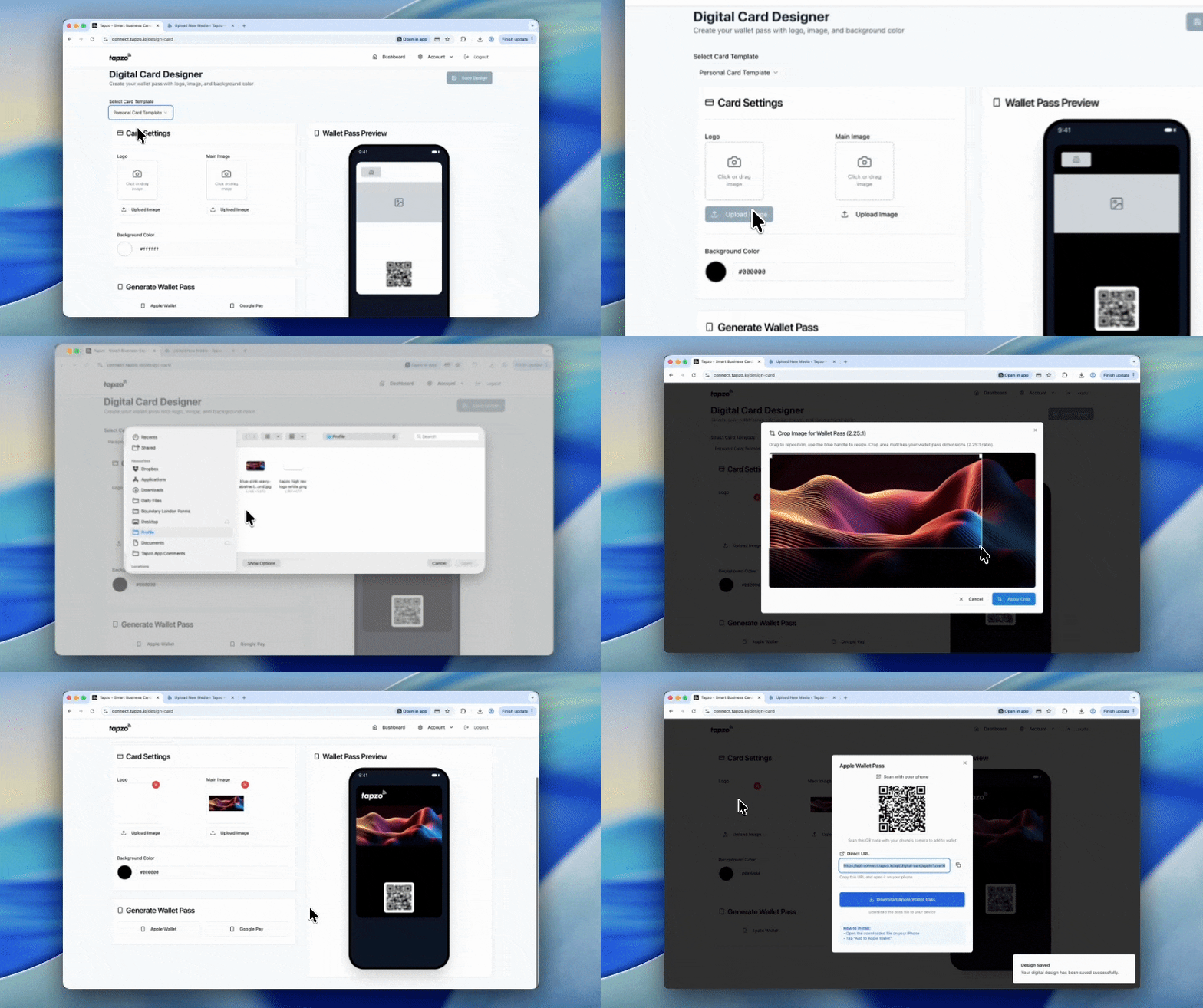
Tapzo Pro Users can create and update the design of their Apple and Google wallet card anytime they like directly from their dashboard.

Free users will be stuck with the Tapzo design Apple / Google wallet card but can upgrade to Pro anytime from their dashboard to unlock the ability to create their own wallet card design.

Upgrading to Pro costs £39.99 for lifetime access, learn more.

Works alongside NFC cards

Your Wallet card does not replace every other sharing method. It works alongside them.

With Tapzo, you can share your digital business card profile by:

Apple Wallet card
Google Wallet card
NFC card
Direct profile link
Email signature
Estate agents

Your Wallet card is one of the easiest ways to share your digital business card from your phone. 

What happens when someone scans your Wallet card?

When someone scans your Tapzo Wallet card:

Their phone reads the QR code.
Your digital business card profile opens.
They can view your latest contact details.
They can save you to their phone contacts.
They can visit all your links and more.
They can send their details back to you.

This makes your Wallet card much more useful than a paper card or a static QR image.

The wallet card is just the doorway. Your digital business card profile is where the real value lives.

Apple / Google Wallet cards vs NFC cards

Wallet cards and NFC cards both help you share your digital business card, but they work differently.

A Wallet card is saved to your phone.

An NFC card is a physical card that opens your profile when tapped on a compatible phone.

The best setup is often both. Use your Wallet card as your always-available digital sharing method and an NFC card when you want a physical, premium tap-to-share experience.

Both open the same Tapzo digital business card profile.

FeatureApple / Google Wallet CardNFC Card
Stored on your phoneYesNo
Physical cardNoYes
Uses QR code sharingYesUsually includes QR backup
Uses tap-to-share NFCNoYes
Good if you forget your cardYesNo
Good for premium physical sharingNoYes
Opens your Tapzo profileYesYes
Can be used with a free Tapzo accountYesYes
Optional add-on neededNoYes

Apple Wallet and Google Wallet cards vs paper business cards

Paper cards get lost. Digital cards get saved.
 

Paper business cards are easy to lose, expensive to reprint, and often become outdated.

Digital business cards solve these problems by giving you a card that is always up to date, easier to share, and more useful after the first introduction.

A Apple Wallet or Google Wallet card gives you a digital sharing method that is always on your phone and always connected to your latest Tapzo profile.

FeatureApple / Google Wallet CardPaper Business Card
Always on your phoneYesNo
Can open a live digital profileYesNo
Can be updated anytime through your profileYesNo
Lets people save your detailsYesManual entry needed
Can include links and socials through your profileYesVery limited
Can capture leads through your profileYesNo
Needs reprintingNoYes
Free to useYes with Tapzo onlyNo

Who should use an Apple / Google Wallet card?

A Wallet card is useful for anyone who wants a quick, simple, phone-based way to share their digital business card.

If you regularly meet people and want them to save your details quickly, a Wallet card is one of the easiest ways to share your digital business card.

It is ideal for:

Business owners
Freelancers
Consultants
Sales teams
Recruiters
Estate agents
Event exhibitors
Networking groups
Students
Creatives
Coaches
Tradespeople
Hospitality teams
Corporate teams
Customer facing staff

Do people need an app to receive your details?

No, Tapzo works natively with iPhones and Androids.

This means the person receiving your Tapzo Wallet card does not need Apple Wallet, Google Wallet, or any apps.

They only need to scan the QR code with their phone’s camera.

Your digital business card profile then opens in their phone’s browser.

What makes a good Apple and Google Wallet card?

A good Wallet card should be quick to open, easy to scan, and clearly linked to a useful digital business card profile.

The Wallet card itself should be simple. The profile behind it should do the real work.

A good Wallet card connected to a good digital business card should have:

A clear QR code
Clean card design
Strong branding
Fast loading digital profile
Easy contact saving
Lead capture
Useful actionable links
Mobile-friendly layout
Analytics

Why choose Tapzo Apple and Google Wallet cards?

Tapzo is the only digital business card platform that gives you a digital business card profile and an Tapzo design Apple or Google wallet card absolutely free for life.

Whether you decide to upgrade to lifetime Pro for a onetime purchase of £39.99 to be able to create your own Apple / Google wallet card design is up to you.

With Tapzo, you can:

Create your profile
Add your contact details, company info, links, socials, booking links, files, and anything else people need after meeting you.
Share it instantly
Install your Wallet card and share directly from your Apple Wallet or Google Wallet.
Get saved faster
Your profile opens on their phone where they can save your details direct to contacts, and send their details back to you.
Update anytime
People can open your profile on their phone, save your details to contacts, and send their own details back to you.
Upgrade to Pro
People can open your profile on their phone, save your details to contacts, and send their own details back to you.
Add optional NFC card
People can open your profile on their phone, save your details to contacts, and send their own details back to you.

Tapzo gives you a digital business card that is not locked to one sharing method.

Wallet, NFC, QR code, link, and email signature all work together.

Are Apple and Google Wallet cards free?

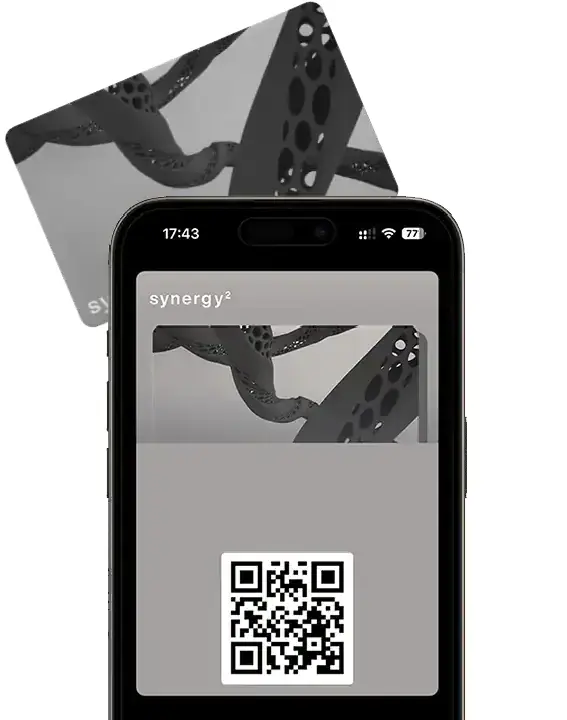
Photo: How free Tapzo Apple wallet card looks.

Normally no, but with Tapzo you can create a free digital business card and save a Tapzo design wallet card to your phone for free.

This lets you start sharing your digital business card for free.

For more control, users can upgrade to Pro to create and update their own custom Wallet card design anytime.

This makes Tapzo one of the most accessible ways to start using a digital business card and Wallet cards.

Create your Apple Wallet or Google Wallet card

Start with a free Tapzo-branded Wallet card, then upgrade to Pro if you want your own custom Wallet design.

FAQ: Apple Wallet and Google Wallet Cards

What is an Apple / Google Wallet card?

An Apple or Google Wallet card is a digital pass saved to the Wallet app on iPhone or Android. With Tapzo, it contains a QR code linked to your digital business card profile.

No. The Wallet card is a sharing tool. Your digital business card is the live online profile people see after scanning your Wallet QR code.

You save your Tapzo Wallet card to Apple Wallet or Google Wallet. When you want to share your details, you open the Wallet card and let someone scan the QR code. Your digital business card profile opens on their phone.

No. The person receiving your Wallet card does not need an app. They only need to scan the QR code, and your digital business card opens in their browser.
Yes. You do not need an NFC card to use Tapzo. You can share your digital business card through Apple Wallet, Google Wallet, QR code, direct link, or email signature.

Yes. Pro users can create their own custom Apple Wallet or Google Wallet card design from their dashboard. Free users get a Tapzo-branded Wallet card.

Your Wallet card opens your Tapzo digital business card profile, and your profile can be updated anytime. This means the QR code continues to lead people to your latest details.
For most modern networking, yes. Wallet cards are easier to access, can open a live digital profile, help people save your details, and do not need reprinting when your details change.
Yes. Tapzo lets free users save a Tapzo-branded Wallet card. Pro users can create a custom Wallet design. Upgrading to Pro costs a onetime £39.99 for lifetime access.

Yes. Each team member can have their own Tapzo profile and Wallet card. Businesses can also use optional company management to control users, branding, leads, and analytics.